
I’ve been working in the Shopify ecosystem for almost a decade—launching my own apps, working for clients, launching my own shops, building themes; generally experimenting in all the different ways. One set of persistent problems for larger shops is search, autocomplete, product filtering, and collection filtering. We want deep and fast search, product and collection filters, and fast autocomplete. We want Shopify search bars that exceed the visitor’s expectations compared to our competitors’s e-commerce stores.
This article’s summary
Search and filtering for Shopify is a big problem for medium and large shops. I launched Search X to provide the fastest, most efficient search app for Shopify—brutal query speed with the smallest possible footprint.
Search X is a response to the many search and filtering apps available for Shopify that I consider to be bloated, slow, inefficient, and difficult to customize. The three core focuses of Search X are 1) lightning fast search query speed performance, 2) the smallest possible page payload size, with just an 18K core javascript/html/css payload with no external library dependencies, and 3) easy and advanced customization, with things like callbacks, tag groups, and custom html options.
Search X is also the only app that provides deep search and filtering on all Shopify entities: Products, Collections, Articles, and Pages.
In short, Search X is the fastest, most efficient search, filtering and autocomplete app for Shopify.
What is the primary problem space?
Search and filtering for Shopify are very hard problems to solve. Many shop owners or clients cannot visualize this. To answer deeper customer demands via search and filtering, like “show me all black in size M”, one will absolutely exceed the development capabilities of Shopify’s liquid language. I have hit the internal liquid memory limit trying to do this before—a badge of honor perhaps, or an exercise in futility. Ultimately, at any reasonable catalog size, deep search and filtering requires an external interpretation of product catalog data—i.e. either a database or a search index, or both.
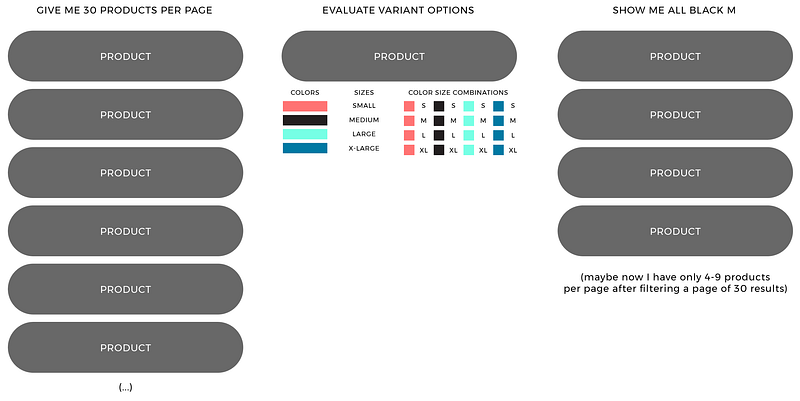
By default, Shopify data calls (either in liquid or via API) return just products with their associated variant data. It is not possible to ask Shopify “show me all black in size M”. In order to understand what is happening across all product variants, i.e. grouping variants by things like color and size—one must look through each product and create groups of variants within each product parent, or build separate collections of data for all black, all size M, and their intersections. In order to say “show me all black in size M” with just Shopify’s liquid or API, one must look through all products with product.variant option_n contains black then filter out results. Simple right? But what about pagination? And what about the fact that we can’t store these evaluations anywhere. We start to end up with uneven numbers of filtered entities in each page. The visitor experience gets slow, memory-bound, wonky, and it all just looks unprofessional—i.e. not good for the visitor.
What is the solution space for the search and filter problem on Shopify?
The solution space has two primary avenues, 1) Shopify’s new Predictive Search feature, which is extremely slow and provides no variant filtering capabilities, and 2) external search bar and filtering apps like Searchanise, Algolia, Boost, Fast Simon, Klevu, and so on.
My experience with Shopify search and filtering apps…
In short, my experience with search and filtering apps has been an exercise in patience and frustration. Using apps like Searchanise, Algolia and Boost frequently surfaced very similar questions:
- Why do these apps load so much javascript on the page? Search X delivers a full 10x smaller payload to the browser for rendering, css and core javascript assets.
- Why are there so many slow and wonky animations that slow down the user search experience?
- Why do they use so many library dependencies like JQuery, Vue, and Modernizr?
- Why can’t I search and filter Collections like I can with products? Why can’t I search and filter Articles like I can with products?
- What are the SEO effects of using these apps?
- Why is this app so hard to customize?!
- And a final question: how much faster can search be?
My final solution: Search X
Search X is an opinionated response to the Shopify search and filter problem. The primary question that created Search X was this: what if I dispense with all of the fluff and built a hardcore search app that gave me what I wanted? What I wanted was:
- fast search for Shopify—like scary fast, how fast can we get, what is the real limit?
- fast autocomplete—again, how fast can we get here? Let’s push the limits.
- deep product, collection and article filtering—treat all entities the same, let me search everything, all the time, everywhere.
- far less javascript on the page—Search X sends ~ 10–20 times less javascript, css and html to the page than the popular search and filtering apps.
- an end to bloated external libraries like JQuery. Sometimes shops use a different version of JQuery by default, and an app will inject another version, so they end up with two Jquery libraries on every page load. I really love JQuery for it’s convenience, but loading two libraries on a customer’s site without them knowing should be criminal.
- absolutely no new experimental javsascript libraries like Vue or Modernizr.
Give it a demo
You can try out the Search X demo site here, where Search X is installed on a default Shopify theme “Debut.” You can also visit the Obey Clothing website, where Search X has been customized a bit to match their design requirements.
You can review all of the Search X features here. Search X has a ton of features, like quick shop / quick view, tag groups, Google Structured Data, color swatches, field boosting, global currencies, reviews support for Shopify Product Reviews app, Loox, Yotpo, JudgeMe, and Stamped.